

Publishing your work on the K-GSP Forum Substack is straightforward once you know the steps. This guide walks you through the entire process from login to publication.

Who We Write For
The K-GSP Forum publishes for curious scholars and professionals hungry for ideas that connect to real work and lived experience. Our readers lead, teach, research, and consult — and they expect writing that meets them at the intersection of intellectual depth and practical relevance.
Our Voice
Warm, rigorous, human. Not a journal abstract. Not a LinkedIn post. Write with a point of view. Hedge where genuine uncertainty exists, but say something worth reading.
Article Types and Word Counts
The K-GSP Journal publishes four article types. Each serves a distinct function. Choose the format that fits your material — and if unsure, consult the editor before drafting.
Expert Opinion (500–2,500 words, recommend 1,000 words excluding reference) — A clearly argued, evidence-grounded perspective on a timely or contested issue
Book Review (500–2,5000 words) — A critical evaluation that locates a book within a larger professional or scholarly conversation
Research Article (500–2,500 words) — Original empirical work, evidence synthesis, or theoretical argument — rigorously grounded, accessibly written
Storytelling (500–2,500 words) — A thought, a shared memory, or a travel experience told with honesty and care — where a single moment opens into something worth reflecting on
What Every K-GSP Forum Article Should Include
A strong opening — a story, a tension, or a question that earns the reader’s attention from the first line. Avoid academic throat-clearing or generic framing. The first two sentences decide whether the reader continues.
A Korean-American insight or diasporic dimension — at least one moment in the piece where the argument connects to the reader’s lived experience as a Korean-American scholar, professional, or global practitioner. This is what distinguishes K-GSP Forum work from generic commentary. The insight can be cultural, institutional, biographical, or analytic — but it must be present and earned, not decorative.
At least one relevant image or figure — horizontally oriented (6:4 ratio) for clean thumbnail rendering on Substack. Photos, charts, or original figures all work; ensure proper attribution and copyright clearance.
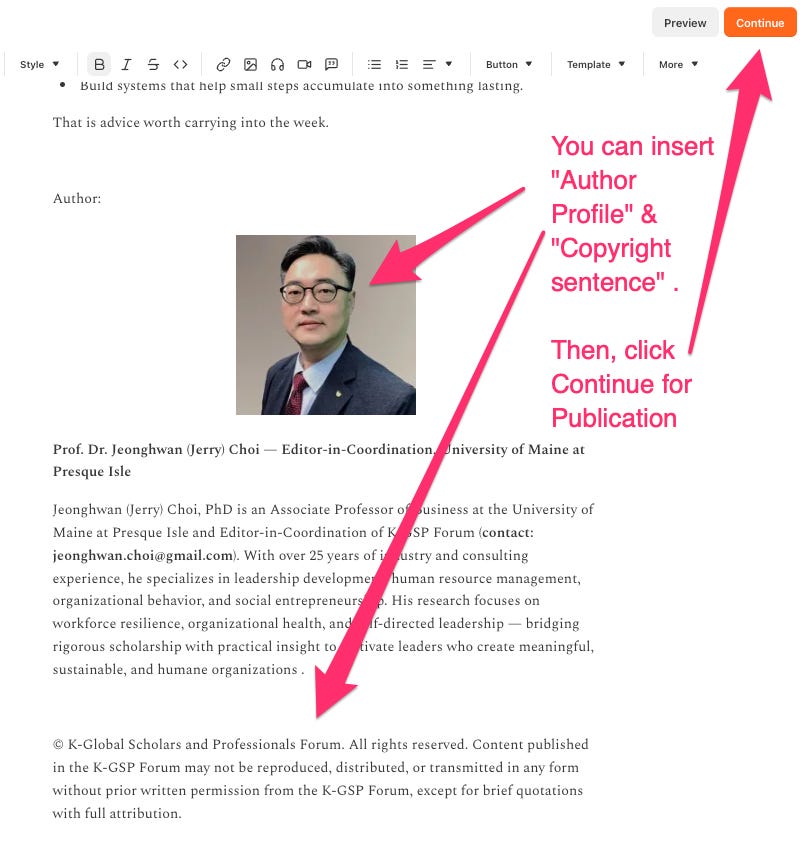
An author bio of 3–5 sentences in third person — including current affiliation, area of expertise, key publications or projects, and (where relevant) the diasporic or cross-cultural vantage point the author brings.
The standard K-GSP Forum copyright notice at the close.
© K-Global Scholars and Professionals Forum. All rights reserved. Content published in the K-GSP Forum may not be reproduced, distributed, or transmitted in any form without prior written permission from the K-GSP Forum, except for brief quotations with full attribution.
Source Integrity
Cite verifiable sources only. Never fabricate data, quotes, or references. APA 7th Edition is the preferred citation style.
Essential Links
Introduction to the K-GSP Forum: https://www.k-gsp.org/p/welcome-to-korean-american-global
Terms of Service: https://www.k-gsp.org/p/korean-american-global-scholars-and
How to Publish: https://www.k-gsp.org/p/how-to-publish-your-article-on-k
Step-by-Step Publishing Instructions
Step 0 — Get Invited
K-GSP Forum is an invitation-based publication. A current Founding Editor or contributor may recommend a potential author, or s/he may contact the Editor-in-Coordination directly. Once approved by founding editors, the Editor-in-Coordination will send an official invitation letter through an Email.
Step 1 — Accept Your Invitation and Log In
After accepting your author invitation — and checking your spam folder if the email doesn’t appear — visit k-gsp.org or kgsp.substack.com and sign in with the email address that received the invitation. This grants you author access to the K-GSP Forum publication.
One important step before you start writing: make sure you are working inside the K-GSP Forum publication, not your personal Substack. After logging in, look for the K-GSP Forum name and logo at the top of your dashboard. If you see your own publication name instead, switch publications before creating any new post.
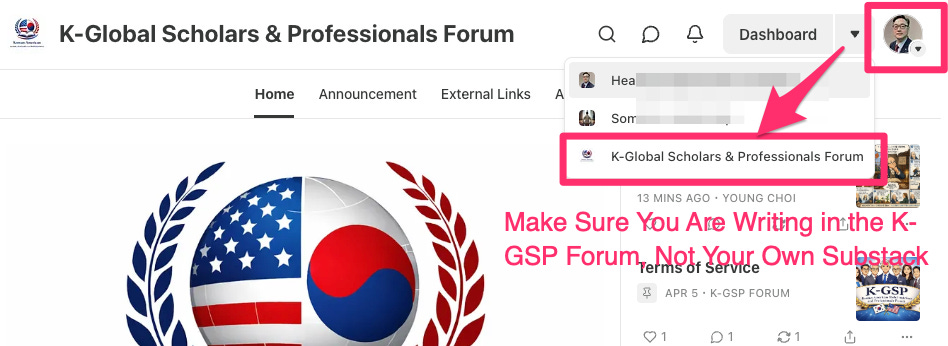
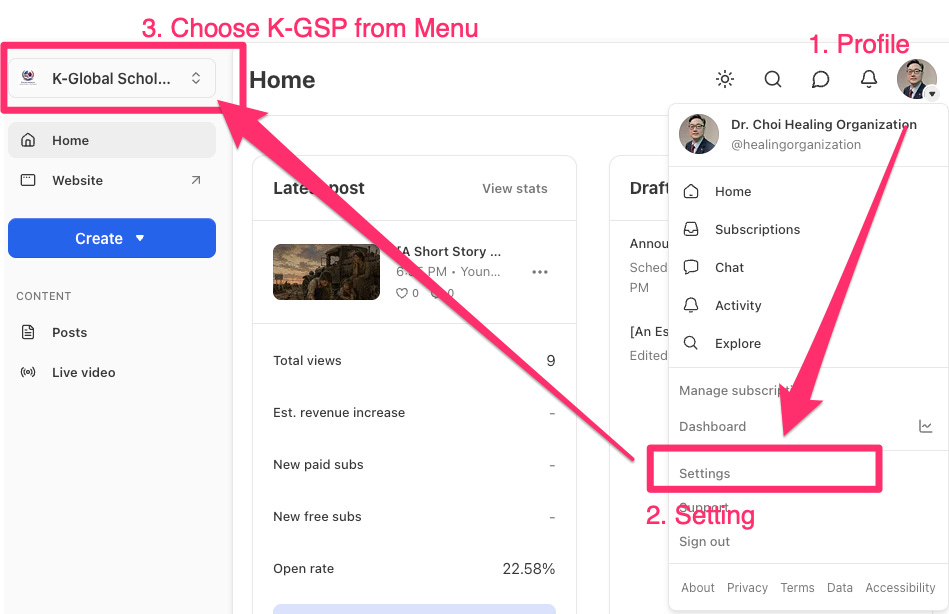
** If it does not work, please click profile and check your Login Email. Then, click settings, and choose K-GSP in the top left menu.
Step 2 — Create a New Post
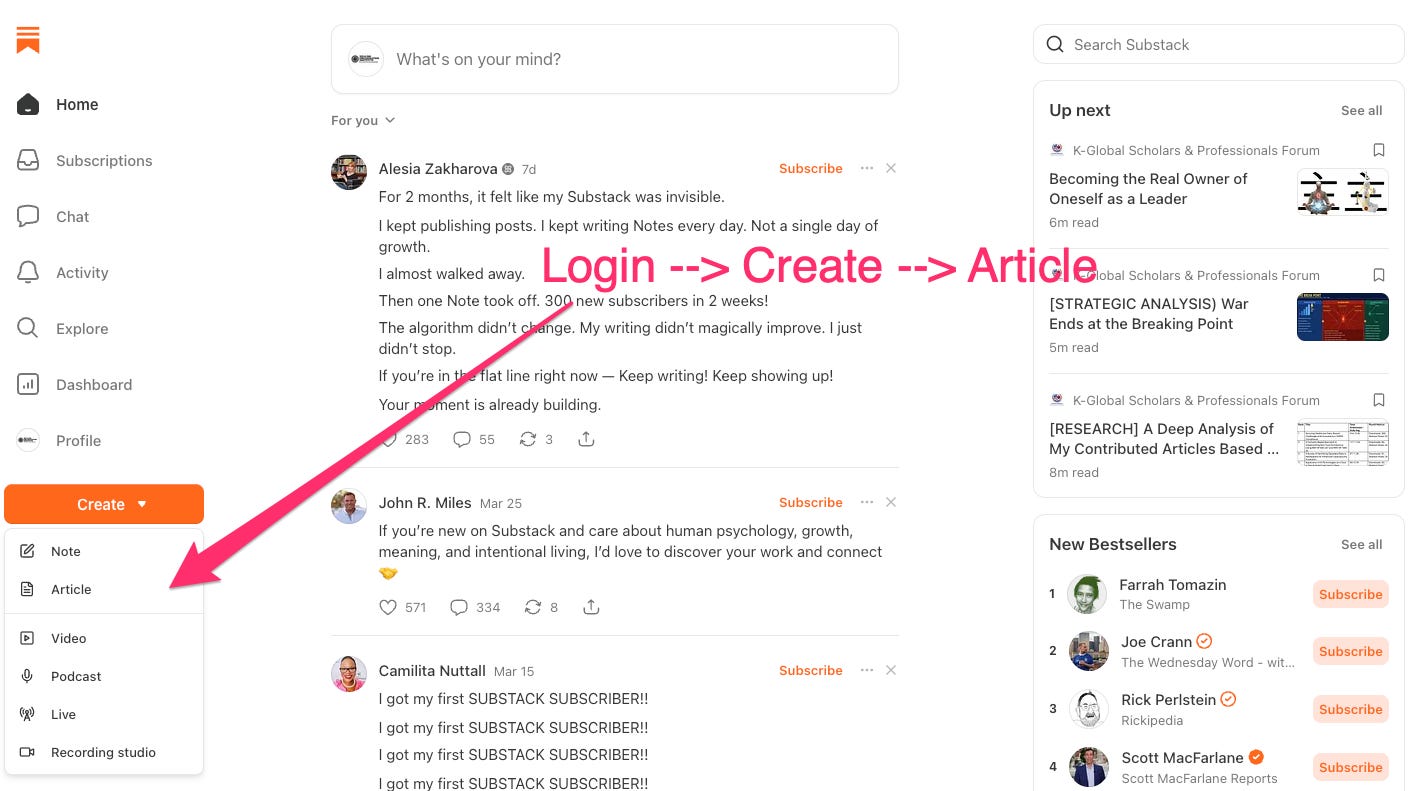
After logging in, click the Create button at the top of your dashboard. A menu will appear offering several types of content. Select Article to begin writing your piece.
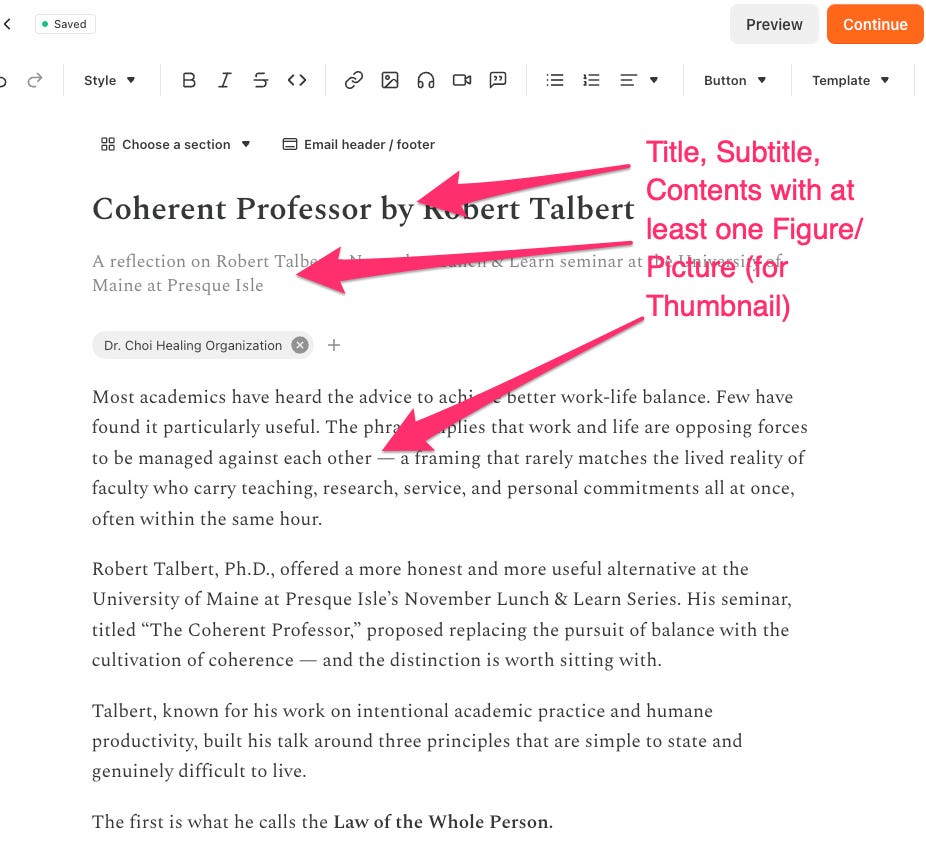
Step 3 — Add Your Title, Subtitle, and Content
Enter a clear and compelling title and a brief subtitle that summarizes your article. Write or paste your content into the editor. Please include at least one figure or image to accompany your text, as visuals strengthen reader engagement and improve the overall presentation of your work.
Step 4 — Add Your Author Profile and Copyright Notice
At the end of your article, insert a brief author profile introducing yourself to readers. Below that, add the following standard K-GSP Forum copyright notice: © K-Global Scholars and Professionals Forum. All rights reserved. Content published in the K-GSP Forum may not be reproduced, distributed, or transmitted in any form without prior written permission from the K-GSP Forum, except for brief quotations with full attribution. Once these are in place, click Continue to proceed to the publication settings.
Step 5 — Configure Your Publication Settings
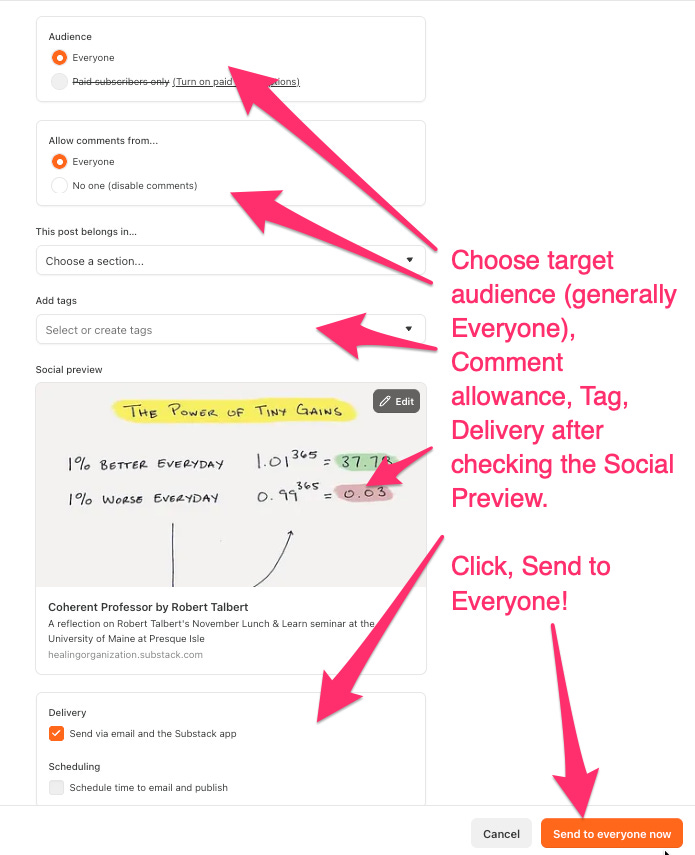
In the publication settings panel, make the following selections. For audience, choose Everyone to make your article publicly accessible to all readers. For comments, select your preferred setting — allowing comments is recommended to encourage community engagement. Add relevant tags to help readers find your article by topic. Check the Social Preview to confirm that your title, subtitle, and cover image appear correctly for sharing on social media and email. When everything looks good, click Send to Everyone to publish.
On September 29, 2026, K-GSP Forum redesigned its homepage for easier navigation. Resident Columnists now have dedicated tagged sections. Authors must apply accurate tags, distinguishing Expert Opinion, Research, Book & Movie Review, Storytelling, and Colunist tag properly.
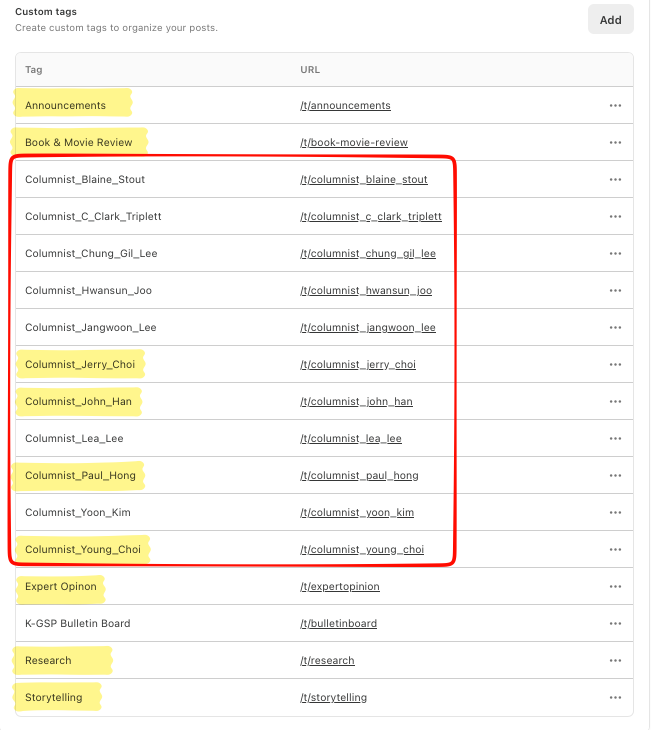
Define the audience and identify who will provide commentary, then specify the tags with precision.
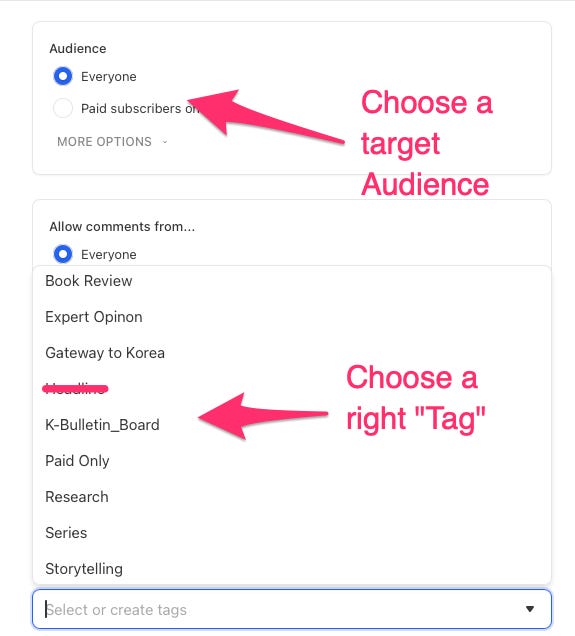
** Headline and Announcement will be solely defined by Editor
Cannot Post a Comment?
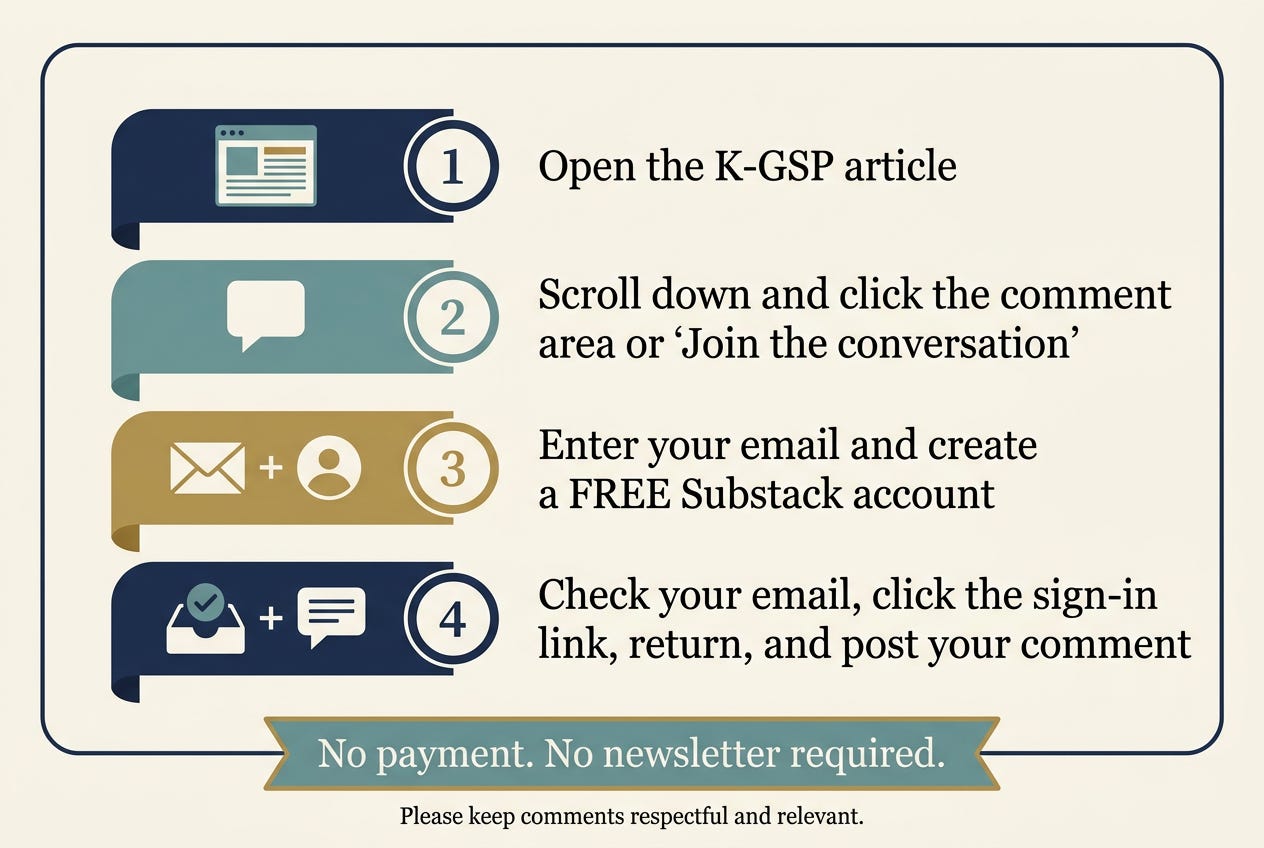
If a user cannot post a comment on a K-GSP Forum article, you may need to sign in to Substack or create a free Substack account first. Anonymous visitors cannot comment.
How to Create a Free Substack Account
Open the K-GSP article
Scroll down and click the comment area or “Join the conversation”
Enter your email and create a FREE Substack account
Check your email, click the sign-in link, return, and post your comment
Scheduling Articles on the K-GSP Forum Substack
When you are ready to publish, open your finalized draft in Substack, click Continue, and select Schedule for later. Choose a publication date and time that maximizes reader engagement — early morning on Tuesday through Thursday typically yields the highest open rates. Avoid weekends and late evenings when readership drops.
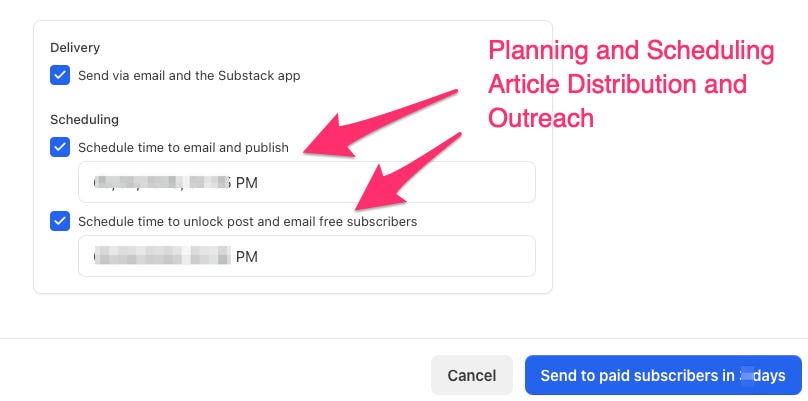
Coordinate your scheduled publication with the Editor-in-Coordination so that formal announcements and community outreach go live in tandem, ensuring broader social impact from the moment your article is published.
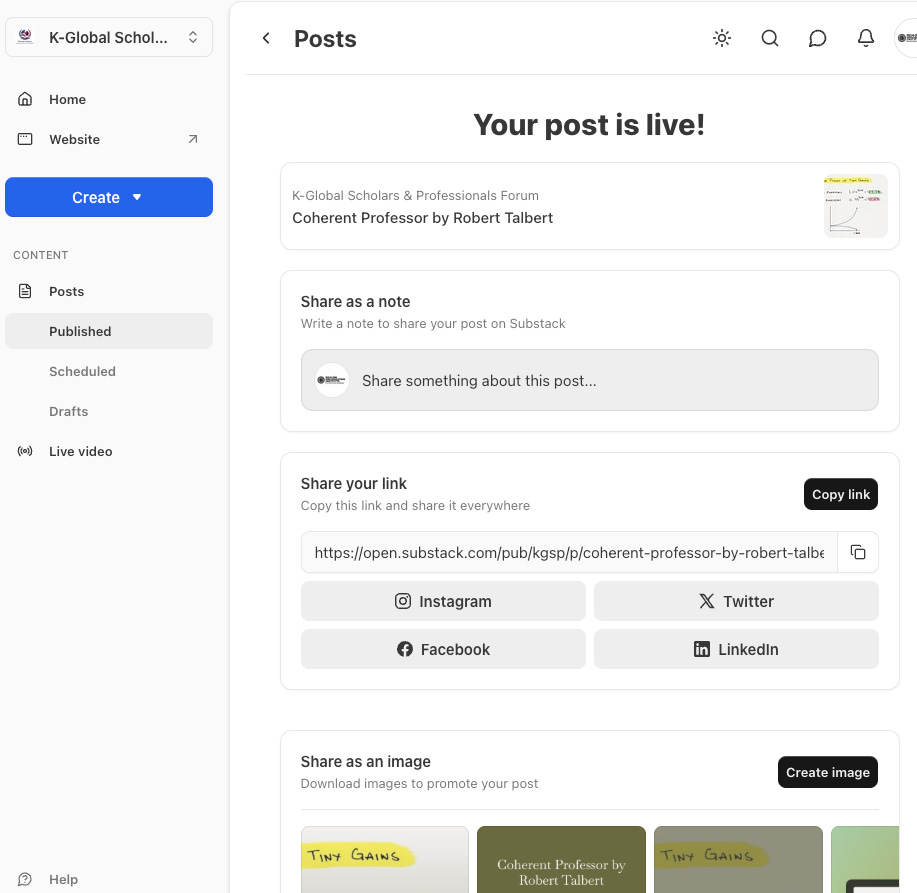
Step 6 — Your Article Is Now Live
Congratulations — your article is now published. It will be automatically delivered to all K-GSP Forum subscribers via email and will be permanently accessible on the K-GSP Forum website at k-gsp.org. Welcome to the K-GSP Journal community of contributors.
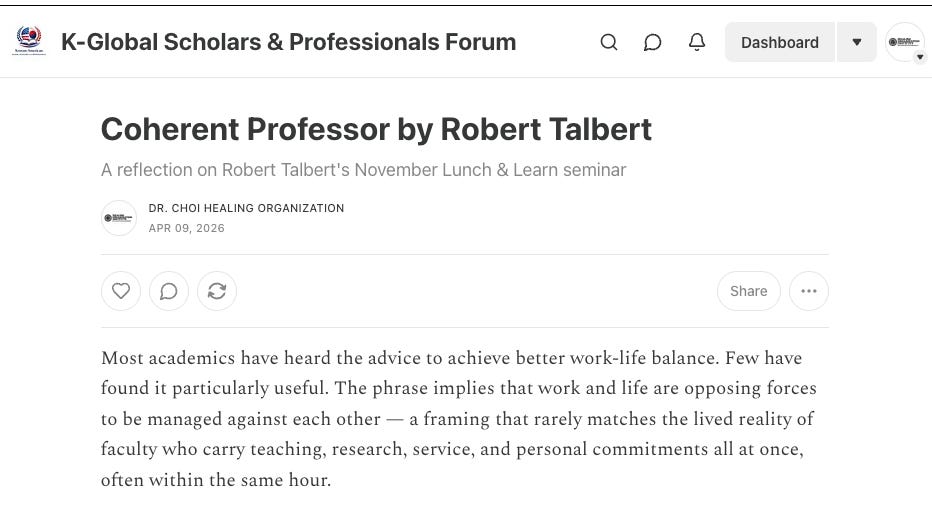
* When Your Formatting Does Not Render: A Simple Workaround
If your content does not display correctly within Substack's HTML-based editor — particularly when it contains complex formatting, mathematical equations, or specialized layouts — consider converting your original file to PDF first, then exporting each page as a JPG image.
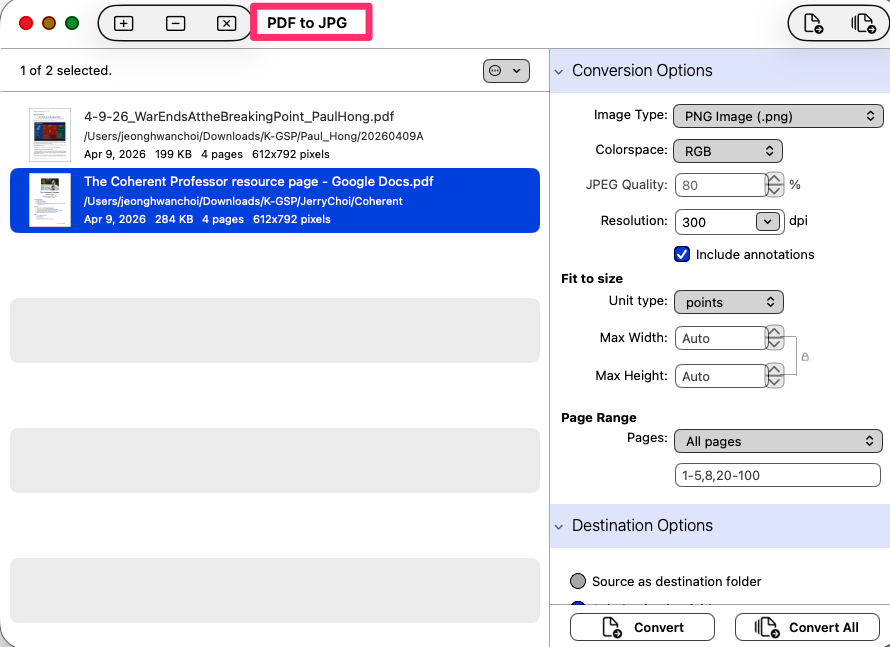
This can be done using free online tools such as Adobe Acrobat Online, Canva, or Smallpdf, or through dedicated desktop software such as Any PDF to JPG or Adobe Acrobat Pro. For Mac, PDF to JPG program is available. Uploading your content as JPG images ensures that the original appearance and formatting of your work is fully preserved in the published post.
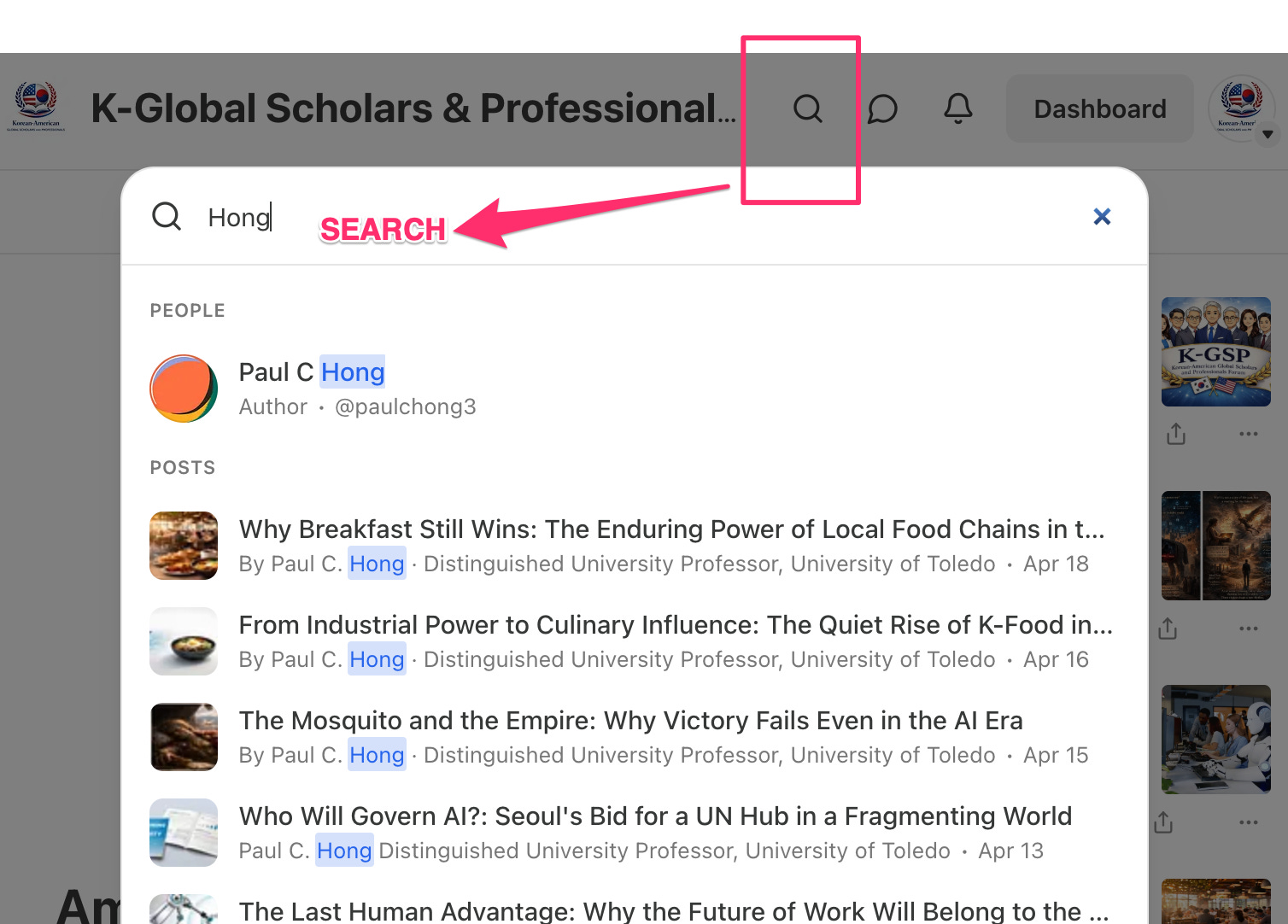
* How to Search Substack by Author and Topic
Substack offers a robust search feature—use it to explore authors and topics within the K-GSP Substack.
How to Deposit Your Research Article and Obtain a DOI via Zenodo for the K-GSP Forum Articles:
📍 Zenodo K-GSP Community
https://zenodo.org/communities/k-gsp/
How to Deposit Your Research Article and Obtain a DOI via Zenodo for the K-GSP Forum Articles

Welcome to the Zenodo Quick Manual for Authors. This guide explains how to deposit your research article in the Journal of K-Global Scholars and Professionals through Zenodo. By following these simple steps, you can upload your manuscript, obtain a free DOI, ensure proper metadata, and make your work permanently citable and openly accessible.
** General note for K-GSP Forum contributors/readers (English):
Some readers have reported difficulty commenting on K-GSP Forum posts, encountering a “security code” prompt. This is Substack’s standard email-verification step for commenting, not a membership or paywall issue: readers do not need a paid subscription to comment on free K-GSP Forum content.
If you see this prompt: enter your email address in the comment box, Substack will send a one-time verification code to that email, and entering it lets you post the comment. If no code arrives, check your spam folder or try a different browser.
Or, you may try to become a “Member” of Substack. At the stage of regisgration, you can setup your own Handle. And, security issue will be addressed through your Email.
© K-Global Scholars and Professionals Forum. All rights reserved. Content published in the K-GSP Forum may not be reproduced, distributed, or transmitted in any form without prior written permission from the K-GSP Forum, except for brief quotations with full attribution.
[한글] K-GSP Forum Substack 기고 안내
기고자 및 초청 저자를 위한 단계별 가이드
K-GSP Forum은 지식과 현장 경험이 만나는 지점에서 진지한 사유를 나누는 학자와 전문가를 독자로 삼습니다. 우리 독자들은 가르치고, 연구하고, 자문하고, 조직을 이끄는 사람들입니다. 이들은 지적 깊이와 현장 적합성을 함께 갖춘 글을 기대합니다.
기고 유형 및 권장 분량
K-GSP Forum은 다섯 가지 기고 유형을 운영합니다. 각 형식은 고유한 역할을 합니다. 자신의 주제와 가장 잘 맞는 형식을 선택하십시오. 확신이 서지 않는다면 초고 작성 전에 편집자와 먼저 상의하시기 바랍니다.
전문가 의견 (800~2,500단어) 시의성 있거나 논쟁적인 주제에 대해 근거를 갖추고 논리적으로 전개한 전문가적 관점
서평 (800~2,500단어) 해당 도서를 더 넓은 전문적·학술적 맥락 속에 위치시키는 비판적 서평
연구 기고문 (800~2,500단어) 독창적 실증 연구, 문헌 종합, 또는 이론적 논변을 엄밀하되 읽기 쉽게 풀어낸 글
스토리텔링 (800~2,500단어) 하나의 생각, 기억, 혹은 여행 경험을 솔직하게 담아낸 글. 사소한 한 순간이 깊은 성찰로 이어지는 형식
일반 에세이 및 나눔글 (800~2,500단어) 살아온 경험에 뿌리를 두고, 그것을 더 보편적인 의미로 확장하는 개인적·직업적 성찰
갤러리 (100~300단어) — 시각적 표현을 위한 큐레이션 공간 — 사진, 예술 작품, 일러스트, 그리고 이미지 기반 서사를 통해, 말만으로는 온전히 담아낼 수 없는 순간, 장소, 그리고 다양한 시각을 포착합니다.
모든 기고문의 권고 요건
첫 줄부터 독자의 주의를 사로잡는 강한 도입부. 이야기, 긴장감, 또는 질문의 형식으로 시작하십시오.
독자 참여와 시각적 완성도를 위한 관련 이미지 또는 도표 최소 1개.
3~5문장 분량의 3인칭 저자 소개.
글 말미에 아래의 K-GSP Forum 표준 저작권 고지문.
© K-Global Scholars and Professionals Forum. All rights reserved. K-GSP Forum에 게재된 콘텐츠는 K-GSP Forum의 사전 서면 허가 없이 어떠한 형태로도 복제, 배포 또는 전송할 수 없습니다. 단, 출처를 명확히 밝힌 간략한 인용은 예외로 합니다.
출처 신뢰성 원칙
검증 가능한 출처만 인용하십시오. 데이터, 인용문, 참고문헌을 절대로 조작하거나 임의로 작성하지 마십시오. 인용 형식은 APA 7판을 기본으로 합니다.
주요 링크
K-GSP Forum 소개: https://www.k-gsp.org/p/welcome-to-korean-american-global
이용 약관: https://www.k-gsp.org/p/korean-american-global-scholars-and
기고 안내: https://www.k-gsp.org/p/how-to-publish-your-article-on-k
단계별 게재 안내
0단계 — 초청 받기
K-GSP Forum은 Invitation (초청) 기반 출판물입니다. 현재 창립 편집자 또는 현재 저자가 잠재적 저자를 추천할 수 있으며, 본인이 직접 편집 Editor-in-Coordination (편집장)에게 연락할 수도 있습니다. 창립 편집자들의 승인이 완료되면, 편집장이 이메일을 통해 공식 초청장을 발송합니다.
1단계 — 초청 수락 및 로그인
저자 초청 이메일을 받고, 초청 수락 후 kgsp.substack.com에 접속하여, 초청받은 이메일 주소로 로그인하십시오. 로그인이 완료되면 K-GSP Forum의 저자 권한이 부여됩니다.
2단계 — 새 포스트 작성 시작
로그인 후 대시보드 상단의 만들기(Create) 버튼을 클릭하십시오. 콘텐츠 유형을 선택하는 메뉴가 나타나면 **기사(Article)**를 선택하여 작성을 시작하십시오.
3단계 — 제목, 부제목, 본문 입력
명확하고 인상적인 제목과 내용을 간략히 요약하는 부제목을 입력하십시오. 본문은 직접 작성하거나 붙여넣기 하십시오. 독자의 몰입도를 높이고 글의 완성도를 높이기 위해, 관련 있는 이미지나 사진을 가능하면 가로형(6:4 비율)으로 최소 한 장 이상 포함해 주세요.
4단계 — 저자 소개 및 저작권 고지문 추가
기고문 말미에 독자에게 자신을 소개하는 간략한 저자 소개를 삽입하십시오. 그 아래에 다음의 표준 저작권 고지문을 추가하십시오.
© K-Global Scholars and Professionals Forum. All rights reserved. K-GSP Forum에 게재된 콘텐츠는 K-GSP Forum의 사전 서면 허가 없이 어떠한 형태로도 복제, 배포 또는 전송할 수 없습니다. 단, 출처를 명확히 밝힌 간략한 인용은 예외로 합니다.
입력을 마친 후 **계속(Continue)**을 클릭하여 게재 설정으로 진행하십시오.
5단계 — 게재 설정 구성
게재 설정 패널에서 다음 항목을 확인하고 설정하십시오.
독자 범위는 **모든 사람(Everyone)**으로 설정하여 기고문이 일반에 공개되도록 하십시오. 댓글은 커뮤니티 참여를 활성화하기 위해 허용을 권장합니다. 독자들이 주제별로 쉽게 검색할 수 있도록 태그를 정확하게 입력하십시오. **소셜 미리보기(Social Preview)**를 통해 제목, 부제목, 커버 이미지가 소셜 미디어와 이메일에서 올바르게 표시되는지 최종 확인하십시오. 모든 준비가 완료되면 **모든 사람에게 보내기(Send to Everyone)**를 클릭하여 게재를 완료하십시오.
※ 헤드라인과 공지글은 검토 후 편집자가 기입합니다.
6단계 — 게재 완료
기고문이 정식으로 게재되면, K-GSP Forum의 전체 구독자에게 이메일로 자동 발송되며, k-gsp.org 웹사이트에 영구적으로 게시됩니다. K-GSP Forum 기고자 커뮤니티에 오신 것을 진심으로 환영합니다.
K-GSP Forum 기고자 및 독자를 위한 안내
일부 독자분들께서 K-GSP Forum 게시물에 댓글을 작성하려 할 때 “보안 코드” 입력 창이 나타나 댓글 작성에 어려움이 있다고 알려주셨습니다. 이는 Substack이 댓글 작성 시 적용하는 일반적인 이메일 인증 절차이며, 회원 자격이나 유료 구독 여부와는 관계가 없습니다. K-GSP Forum의 무료 콘텐츠에는 유료 구독 없이도 댓글을 작성하실 수 있습니다.
보안 코드 입력 안내가 표시될 경우, 다음 절차를 따라 주시기 바랍니다.
댓글 입력란에 본인의 이메일 주소를 입력합니다.
Substack이 해당 이메일 주소로 일회용 인증 코드를 발송합니다.
이메일로 받은 인증 코드를 입력하면 댓글을 게시할 수 있습니다.
인증 코드가 도착하지 않는 경우에는 스팸함 또는 프로모션함을 확인해 주시고, 필요하다면 다른 인터넷 브라우저를 이용해 다시 시도해 보시기 바랍니다.
또한 Substack에 무료 회원(Member) 으로 가입하는 방법도 있습니다. 가입 과정에서 본인만의 핸들(Handle) 을 설정할 수 있으며, 이후 이메일 인증을 통해 보안 확인 절차를 보다 원활하게 진행할 수 있습니다.
***서식 오류 발생 시 해결 방법
Substack의 HTML 편집기에서 서식이 올바르게 표시되지 않는 경우 — 특히 수식, 복잡한 표, 또는 특수 레이아웃이 포함된 경우 — 다음 방법을 권장합니다. 원본 파일을 PDF로 변환한 후, 각 페이지를 JPG 이미지로 내보내어 업로드하십시오.
변환 작업은 Adobe Acrobat Online, Canva, Smallpdf 등의 무료 온라인 도구를 활용하거나, Any PDF to JPG, Adobe Acrobat Pro 등의 전용 프로그램을 통해 진행할 수 있습니다. Mac 사용자라면 기본 제공되는 미리보기 앱을 활용하는 것도 좋은 방법입니다. JPG 이미지로 업로드하면 원본의 디자인과 서식이 그대로 보존됩니다.
***Substack에서 저자와 주제로 검색하는 방법
Substack은 강력한 검색 기능을 제공합니다—K-GSP Substack 내에서 저자와 주제를 기준으로 탐색해 보세요.
Zenodo를 활용한 K-GSP Forum 아티클 연구논문 등록 및 DOI 발급 방법 (https://zenodo.org/communities/k-gsp/)
📍 Zenodo K-GSP 커뮤니티
https://zenodo.org/communities/k-gsp/
How to Deposit Your Research Article and Obtain a DOI via Zenodo for the K-GSP Forum Articles
Welcome to the Zenodo Quick Manual for Authors. This guide explains how to deposit your research article in the Journal of K-Global Scholars and Professionals through Zenodo. By following these simple steps, you can upload your manuscript, obtain a free DOI, ensure proper metadata, and make your work permanently citable and openly accessible.
© K-Global Scholars and Professionals Forum. 모든 권리 보유.
K-GSP Forum에 게재된 모든 콘텐츠는 K-GSP Forum의 사전 서면 허가 없이 어떠한 형태로도 복제, 배포 또는 전송할 수 없습니다. 다만, 출처를 명확히 표시한 짧은 인용은 예외로 허용됩니다.
[End of Document]
Updated on Setp. 30, 2026 : Added the Propoer Tag application after restructuring the website.